Ink Bleed
Plugin · Photoshop plugin · v0.9.1
Overview
A panel for Photoshop that turns clean type into bled, inked and distressed lettering, with a live preview.
Price
Billed every month through PayPal. Cancel any time in your PayPal account; access lasts to the end of the month you paid for.
One payment through PayPal, no renewals.
Loading PayPal…
Version
0.9.1 · Changes
Works with
Photoshop 2024 (25.0) or later · Windows
Category
Plugins · Photoshop plugin
What's included
- Ink Bleed plugin (.ccx installer)
- Ink Bleed and Distress tabs
- Distress: 59 modules and 16 built-in recipes
- Live preview panel (pop-out)
- Your own presets and recipes
About it
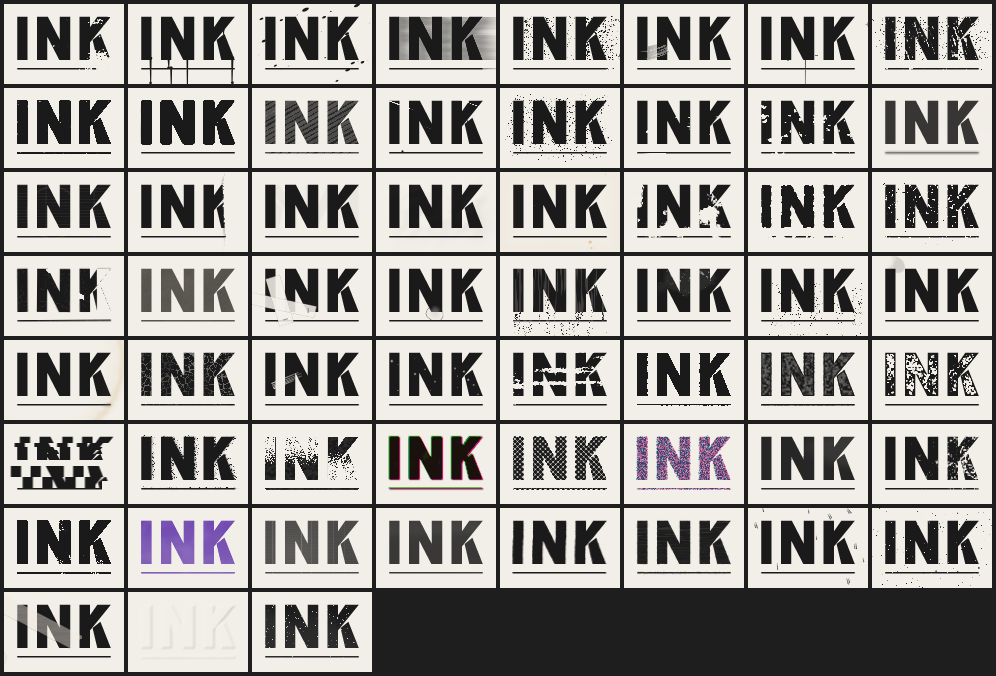
Ink Bleed is a UXP panel for Photoshop with two tabs. Ink Bleed spreads the ink like it soaked into paper. Distress is a filter gallery: 59 modules in five categories (Ink, Paper, Damage, Process, Finish) and 16 built-in recipes.
A separate preview panel shows the result live and can be popped out. Save your own presets and recipes, and export or import them as files.
Read as Tone takes photos and shaded art as well as type. Both tabs have Edit and Rebuild, Batch apply and a Split before/after view. Defaults are subtle, like a real scan of a real print; the drama is at the top of the sliders.
It never touches your layer: every result is a new group you can toggle or delete, and one Apply is one history step. Locked layers and layers in locked groups work too.
Requirements
- Photoshop: Photoshop 2024 (25.0) or later
- Runs on: Windows
- Mac: not tested yet
Changelog
0.9.1 · 2026-11-15
- Panel pass
0.9.0 · 2026-11-15
- Distress gallery browser: find, filter, pin and favourite modules, Surprise me, a gallery of thumbnails
0.8.0 · 2026-11-15
- Ink library: India ink, fountain pen, marker, ballpoint, stamp pad, spray, sumi
0.7.0 · 2026-11-15
- Direction of print and pass direction
0.6.0 · 2026-11-15
- Misregistration: colour separations into CMY/CMYK plates, off register, overprinted
0.5.0 · 2026-11-15
- Read as (Auto / Shape / Tone): photos and shaded art read as ink density
0.4.0 · 2026-11-14
- Six new papers (kraft, blotting, cold-press, washi, recycled, corrugated) and a paper picker
0.3.2 · 2026-11-14
- New icon
0.3.1 · 2026-11-13
- Locked layers and layers in locked groups no longer break Apply (both tabs)
0.3.0 · 2026-11-13
- New Distress tab
- New panel look
0.2.0 · 2026-11-13
- Live preview, with a pop-out panel
- Deeper controls
- Your own presets
0.1.1 · 2026-11-08
- Fixed a panel that stopped responding
0.1.0 · 2026-11-07
- First build
Licence
Licence key Licence key: yes. It is on your download page right after you pay.
One person, personal and client work, paid work included. Don’t resell, share or re-upload the files. Full terms on the licence page.